One Terminal Command Gives Forgotten Android Hardware a Second Life on the Desk
A report from Ars Technica highlights how a single terminal command can revive forgotten Android devices, converting idle mobile hardware into functional desktop monitors and workstation accessories.
In this piece
A new guide from Ars Technica shows how a single terminal command can repurpose neglected Android smartphones and tablets into dedicated desktop workstation…
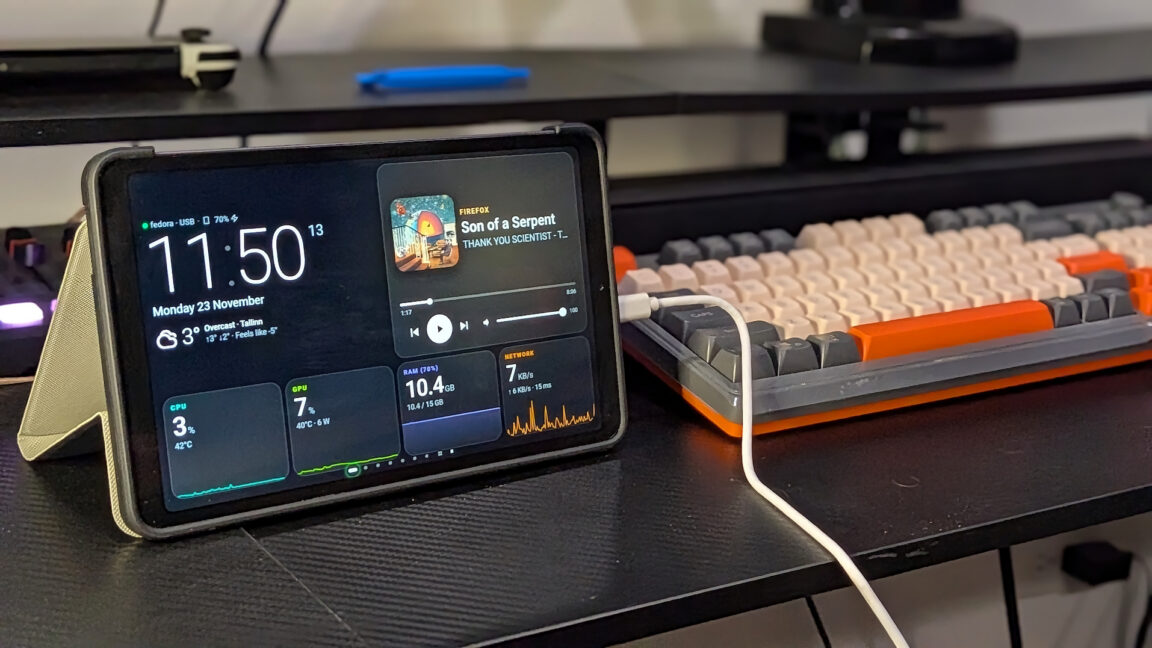
A newly published report from technology outlet Ars Technica demonstrates how a single command line instruction can grant discarded Android hardware a second life as a dedicated desk accessory. The approach focuses on repurposing aging smartphones and tablets that have otherwise been retired from active daily mobile service, transforming them into functional tools for modern computer workstations. By tapping directly into device interfaces, users can quickly unlock practical secondary roles for forgotten electronics.
According to the report, running targeted terminal commands allows users to interface directly with core Android subsystems, bypassing sluggish interfaces to establish reliable workstation utilities. While the publication explores the practical workflow for revitalizing idle hardware, implementation details often depend on specific operating system versions and device architectures. Observers note that such methods provide an accessible entry point for users seeking streamlined desktop integration without complex modifications.
Modern desktop setups increasingly interface with mobile devices through developer utilities such as the Android Debug Bridge and terminal emulator packages. These command-line tools provide direct access to display forwarding, automated background scripts, and lightweight network services without the overhead of heavy consumer apps. With minimal configuration, an ordinary desktop environment can establish a direct communication bridge to an auxiliary handheld.
The repurposing strategy directly addresses a widespread challenge across personal computing, where millions of capable mobile handsets end up discarded once manufacturer updates cease. Because the processing chips and high-resolution displays on older devices frequently retain significant performance capability, repurposing them helps mitigate growing electronic waste. It also eliminates the need for consumers to purchase separate single-purpose commercial gadgets.
In everyday workspace environments, converted mobile devices routinely serve as dedicated information displays, system performance monitors, media controllers, or local network servers. Delegating these persistent tasks to a secondary screen frees up valuable desktop monitor space and offloads minor processing demands from the main computer. The setup allows users to glance at notifications, chat feeds, or hardware metrics without disrupting primary workflows.
Legacy mobile operating systems nonetheless present operational considerations when integrated into contemporary home or office networks. Older builds of Android inevitably lack current security patches and active software support from original equipment manufacturers. Technical experts generally recommend keeping such devices isolated on private local networks and restricting public internet exposure to maintain digital security.
The technique highlighted by Ars Technica reflects a broader trend across the tech community toward hardware sustainability and consumer self-reliance. Open-source developers have spent years crafting diverse terminal utilities and lightweight scripts designed to extend the operating life of consumer electronics. This growing ecosystem demonstrates how simple software commands can challenge standard industry upgrade cycles.
Long-term desk usage also introduces physical maintenance factors, particularly regarding battery health and thermal management under continuous wall power. Tech analysts advise that devices remaining plugged into desktop docks should ideally utilize software charge limits or battery-bypass routines where supported. Managing heat and charge levels helps ensure that repurposed hardware remains safe and reliable over months of stationary operation.
Looking ahead, software-driven refurbishment techniques are expected to gain wider traction among technology enthusiasts, remote workers, and environmental advocates. As publications and developer forums continue refining single-command scripts and accessible workflows, repurposing obsolete gadgets will become progressively simpler for everyday computer users. The continued development of these lightweight utilities offers a practical roadmap for transforming digital clutter into productive workstation assets.
Primary source: Ars Technica. Newzly rewrites and structures source reporting for clarity; verify critical details at the original.